I picked up the Volcano source code while preparing to contribute to it and apply for LFX mentorship. What I expected to be a quick orientation turned into a full deep dive into how Kubernetes batch scheduling actually works under the hood. This article captures what I learned, written in the way I wished I had found it when I started: code-first, with real examples and real log output from a live cluster running on my machine. A code-first breakdown of how Volcano fixes the distributed job scheduling problem
The Problem
You submit a distributed training job. It needs 8 pods , all running simultaneously. Your cluster has room for 6.
Kubernetes starts 6. The other 2 stay Pending. The 6 running pods hold CPU and memory while waiting for the missing 2. The 2 Pending pods cannot start because those 6 already hold all remaining resources.
Result: resource deadlock. Pods consuming cluster capacity while producing zero output.
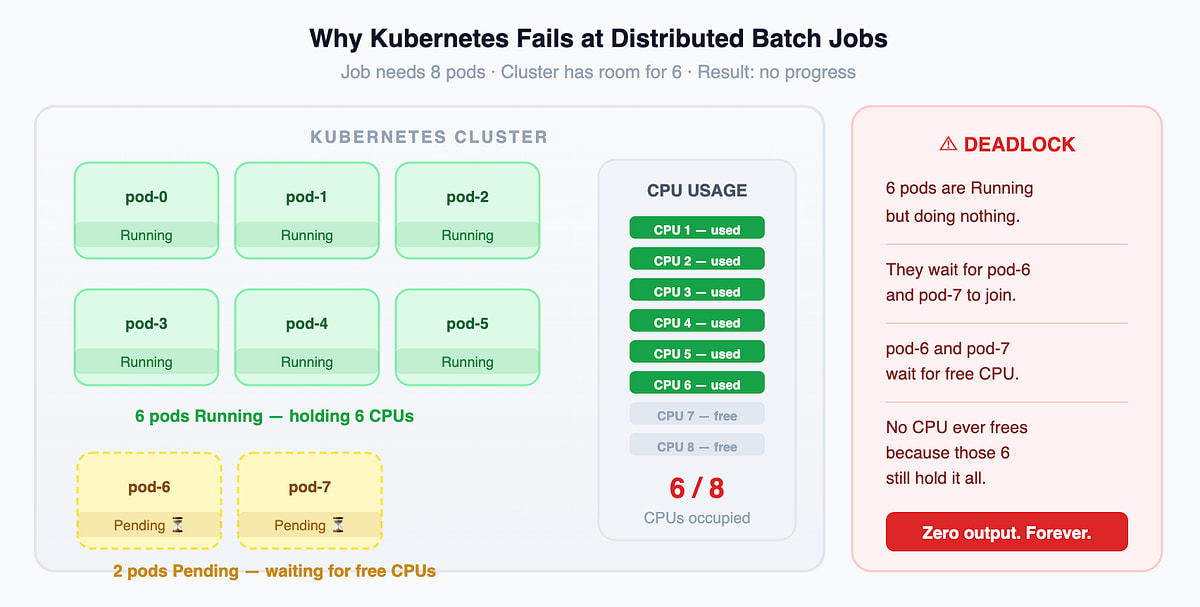
This is not a Kubernetes bug. It is a design mismatch. Kubernetes was built for long-running services — web servers, APIs, databases. It places pods one at a time as resources appear. For batch workloads that need all-or-nothing placement, that greedy approach causes deadlocks.
Volcano fixes this at the controller layer.
What Volcano Is
Volcano is a CNCF-incubating project that adds batch scheduling on top of Kubernetes. It is built for distributed ML training (PyTorch, TensorFlow), big data processing (Spark, Flink, Ray), HPC workloads (MPI), and any job where all pods must start at the same time.
It is not a replacement for Kubernetes. Volcano runs on top of it. Three components make it work: Controllers, Scheduler, and Webhooks. This article covers Controllers.
Asides: Volcano is described as “CNCF incubating.” This means it is production-ready for many use cases, but the API is not yet considered stable. Breaking changes can happen between minor versions. Always check the compatibility table before upgrading in a production environment.
Pros of using Volcano
- Gang scheduling eliminates resource deadlocks
- Works with Spark, TFJob, MPIJob without changes to those frameworks
- Built-in retry logic and fault tolerance through the policy system
- Queue-based fair sharing gives different teams guaranteed resource budgets
Cons of using Volcano
- Adds three new Kubernetes resource types (Job, Queue, PodGroup) that your team needs to understand and monitor
- Requires setting schedulerName: volcano on pods, which may conflict with existing tooling
- Debugging requires understanding three layers simultaneously: controller, scheduler, and the state machine
- The learning curve is steeper than standard Kubernetes workloads
Further Reading: https://volcano.sh/en/docs/architecture/
Three Concepts You Must Understand First
1. Job (VCJob)
A Volcano Job defines a distributed workload with multiple task types.
apiVersion: batch.volcano.sh/v1alpha1
kind: Job
metadata:
  name: bert-training
spec:
  minAvailable: 8
  schedulerName: volcano
  queue: ml-research
  maxRetry: 3
  policies:
    - event: PodFailed
      action: RestartJob
  tasks:
    - name: ps
      replicas: 1
    - name: worker
      replicas: 7
Three fields drive all controller decisions:
- minAvailable: 8 is the gang scheduling guarantee. The scheduler will not place any pods from this job unless it places at least 8 simultaneously. This is the deadlock fix.
- Policies is your error handling contract. When a PodFailed event fires, the controller triggers RestartJob. You write this once in YAML and the controller enforces it automatically every time.
- Tasks shows that a Job is not a single pod template. A training job has a parameter server task and a worker task with different container images, different resource requirements, and different replica counts.
Further Reading: github.com/volcano-sh/apis/blob/master/pkg/apis/batch/v1alpha1/job.go
2. Queue
A Queue is a resource budget with an identity. It is not a waiting line. Think of it as a department allocation inside a shared cluster.
apiVersion: scheduling.volcano.sh/v1beta1
kind: Queue
metadata:
  name: ml-research
spec:
  weight: 4
  capability:
    cpu: 40
  reclaimable: true
Big Word Alert - Weight: Weight controls proportional resource share during contention. weight: 4 means this queue gets 4 times the resources of a weight: 1 queue when both are competing. It does not guarantee a fixed amount of resources.
What each field controls:
- weight sets the fair share proportion when multiple queues compete for the same cluster capacity
- capability is a hard ceiling that is enforced even when the cluster sits completely idle
- reclaimable: true means idle quota from this queue gets lent to other queues, and reclaimed back when needed
Multiple jobs run inside one queue at the same time. The queue tracks their combined resource consumption. A new job that would push the total past the capability limit is held by the scheduler until space frees up.
Asides: Queue capacity is sometimes described as though jobs simply wait in line and run in order. That is not how it works. The scheduler evaluates queue utilization dynamically on every scheduling cycle. A newer job can be scheduled ahead of an older job if the older job requires more resources than what is currently available in the queue. The ordering is driven by resource availability and queue weight, not submission time.
Further Reading: github.com/volcano-sh/apis/blob/master/pkg/apis/scheduling/v1beta1/types.go
3. PodGroup
A PodGroup is the atomic scheduling unit. You never create one manually. The Job controller creates it automatically when you submit a VCJob.
The Volcano scheduler does not read Jobs directly. The scheduler reads PodGroups inside Queues.
PodGroup "bert-training-abc123"
  spec:
    minMember: 8
    queue: ml-research
    minResources:
      cpu: "18"
      memory: "36Gi"
  status:
    phase: Pending → Inqueue → Running → Completed
The minResources field is how a single PodGroup object represents the total resource requirement of the entire job. When the Job controller creates the PodGroup, it calculates the sum: for each task, it multiplies one pod’s resource request by that task’s minAvailable, then adds all tasks together. For a job with 1 ps pod needing 4 CPUs and 7 worker pods each needing 2 CPUs, minResources becomes cpu: 18. The scheduler reads this one number and knows immediately whether the queue has room, without looking at individual pods that do not exist yet.
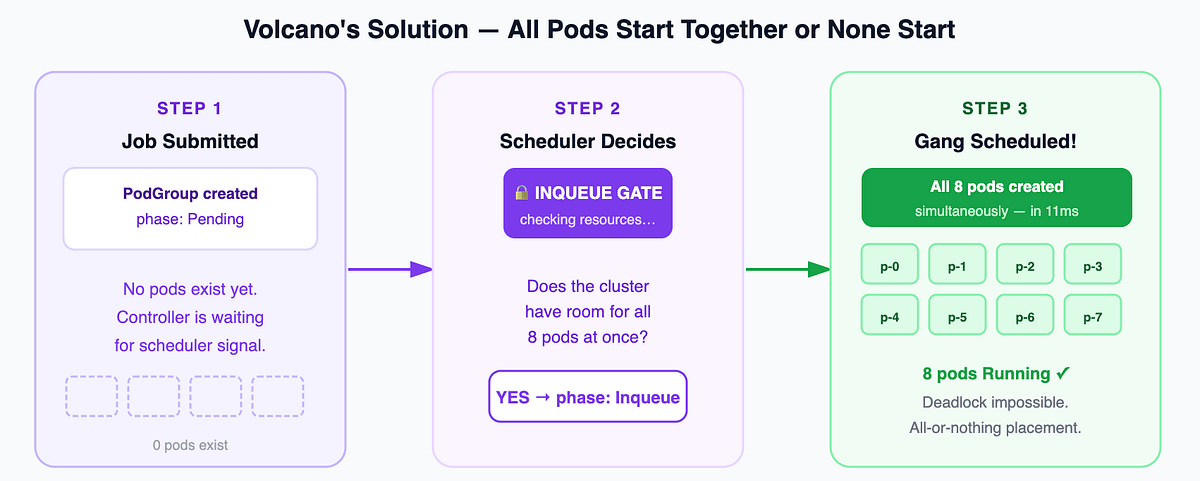
Big Word Alert - Inqueue: Inqueue is Volcano’s gang scheduling gate. The scheduler moves a PodGroup to Inqueue only after confirming the cluster has enough resources for all minMember pods simultaneously. The Job controller watches for this transition and creates zero pods until the PodGroup reaches Inqueue. This is the exact moment deadlock is prevented: pods get created only after the scheduler commits to placing all of them.
Inqueue also serves a second purpose: it controls how many pods the scheduler has to evaluate per cycle. When a PodGroup is in Pending phase, zero pods exist in the cluster. The scheduler evaluates one PodGroup object per job, not individual pods. In a cluster with 500 queued jobs of 200 pods each, without Inqueue the scheduler would have 100,000 pending pods to check against every node on every cycle. With Inqueue, it evaluates 500 PodGroup objects using the minResources field. Only jobs that move to Inqueue have their pods created, and those pods get placed immediately because the scheduler already confirmed the space. The scheduler never accumulates a backlog of unschedulable pods slowing down every cycle.
PodGroup is also framework-independent. TFJob, SparkApplication, and MPIJob are not Volcano Jobs. If a pod sets schedulerName: volcano, the PodGroup controller creates a PodGroup for it automatically. One annotation gets any framework full gang scheduling without Volcano-specific logic in that framework.
Asides: The phrase “framework-independent” needs a caveat. The framework must set schedulerName: volcano in the pod spec. Some operators hard-code the scheduler name or do not expose it as a configurable field. In those situations you need to patch the operator source, build a custom image, or use an admission webhook to inject the scheduler name automatically.
Further Reading: https://volcano.sh/en/docs/podgroup/
How the Three Controllers Work
The Controller Framework
Every controller in Volcano implements a single three-method interface:
type Controller interface {
    Name()       string
    Initialize() error
    Run()
}
Initialize wires up informers, work queues, and dependencies. Run starts the reconcile loop and keeps it running until the process shuts down.
Big Word Alert - Informer: An informer is a local in-memory cache of Kubernetes API state. Instead of asking the API server every second what pods currently exist, an informer receives a stream of change events and fires handlers immediately when something changes. Reading from an informer cache costs no network round-trip and no API server load.
Controllers self-register using Go’s init() function, which runs before main(). By the time the controller manager starts, every imported package has already registered its controller into a global map. No manual wiring, no configuration files listing which controllers to start.
Further Reading: github.com/volcano-sh/volcano/blob/master/pkg/controllers/framework/interface.go
The Job Controller
The Job controller manages the complete lifecycle of a VCJob. Pod creation, state transitions, error handling, and restart logic all flow through this one controller.
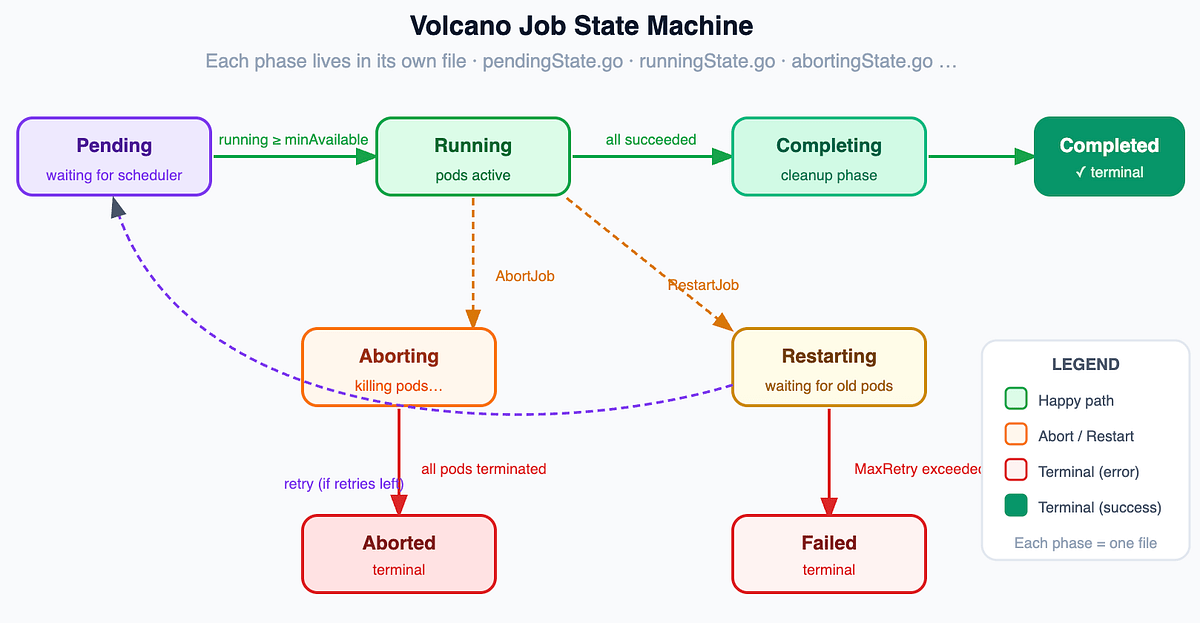
The state machine routes each job phase to a dedicated file in pkg/controllers/job/state/:
- pending.go: waits until running + succeeded + failed pods reach minAvailable, then transitions the job to Running
- running.go: checks completion conditions, handles pod regressions, decides Completed or Failed
- aborting.go: calls KillJob every reconcile cycle until all pods are terminated, then moves the job to Aborted
- restarting.go: guards the MaxRetry counter, waits for old pods to clear, then moves back to Pending
- Failed terminal, no more transitions
Big Word Alert - Reconcile Loop: A reconcile loop is an infinite loop that runs the same logic repeatedly: read current state, compare to desired state, take action to close the gap, repeat. Controllers do not react to direct commands. They react to state changes and continuously bring reality in line with what the YAML declares should exist.
The Job controller also has its own plugin system, separate from the scheduler plugins. Different distributed frameworks need different supporting infrastructure. An MPI job needs SSH keys. A PyTorch job needs pod DNS names. A Spark job needs environment variables injected. The controller cannot hardcode every framework’s requirements, so it provides lifecycle hooks and lets plugins handle the framework-specific work.
Plugins fire at two moments:
- pluginOnJobAdd fires once when the job is first created. Job-level setup goes here: create the headless Service, generate the SSH key pair.
- pluginOnPodCreate fires once per pod, right before each pod is sent to Kubernetes. Pod-level modifications go here: inject env vars, mount the SSH keys into this specific pod.
The three built-in plugins:
- svc creates a headless Kubernetes Service for the job. This gives every pod a stable DNS name so pods can find each other by hostname rather than by IP address, which changes every time a pod restarts.
- env injects environment variables into every pod: the job name, task name, the index of this pod within its task, and total replica count. The training framework reads these at startup to know its own identity and who its peers are.
- ssh generates an SSH key pair, stores it as a Kubernetes Secret, and mounts the keys into every pod. MPI jobs use SSH to start worker processes on remote pods. Without a shared key that all pods trust, this is not possible.
You declare which plugins your job needs under spec.plugins in the YAML. The mutating webhook automatically adds svc and ssh for MPI and distributed framework jobs if you forget to declare them.
Real log output from a live cluster. Here is the moment 6 pods were created simultaneously after the scheduler approved the PodGroup:
I0619 13:54:48.303294 pluginOnPodCreate: env on job: <default/test-job
I0619 13:54:48.303358 pluginOnPodCreate: ssh on job: <default/test-job
I0619 13:54:48.303363 pluginOnPodCreate: svc on job: <default/test-job
(18 lines total - 3 plugins × 6 pods, all firing in under 11 milliseconds)
Zero pods to 6 pods in 11 milliseconds. That is gang scheduling in action.
Before that, the controller waited quietly for exactly 1 second — the time the Volcano scheduler needed to evaluate the PodGroup and issue the Inqueue signal:
I0619 13:54:47.510592 Execute <SyncJob on Job <default/test-job in <Pending
I0619 13:54:47.510556 Job <default/test-job has not updated for no changing
(1 second passes - scheduler evaluating)
I0619 13:54:48.303294 pluginOnPodCreate: env on job: <default/test-job>
Asides: The line “has not updated for no changing” looks like an error. It is not. It means pendingState checked whether running + succeeded + failed pods reached minAvailable, the answer was no, and the controller correctly did nothing. This line fires once per incoming event during the waiting period and can appear dozens of times. That is expected behavior, not a sign of something broken.
Further Reading: github.com/volcano-sh/volcano/blob/master/pkg/controllers/job/job_controller.go and github.com/volcano-sh/volcano/blob/master/pkg/controllers/job/state/pending.go
The Queue Controller
The Queue controller manages Open → Closing → Closed transitions and keeps status counters synchronized with the PodGroups running inside each queue.
When you run vcctl close queue ml-research, here is the full path:
- vcctl creates a Command object in Kubernetes targeting ml-research
- The controller picks up the Command
- The controller deletes the Command (consumed, not needed again)
- The controller pushes CloseQueueAction to the main work queue
- openState checks whether active PodGroups exist in the queue
- No active PodGroups means the queue moves immediately to Closed. Active PodGroups move the queue to Closing, and the controller keeps reconciling until all jobs finish.
Further Reading: github.com/volcano-sh/volcano/blob/master/pkg/controllers/queue/queue_controller.go
The PodGroup Controller
The PodGroup controller has one job: create PodGroups for pods that do not already have one. This enables gang scheduling for any workload using Volcano as its scheduler, not just VCJobs.
Three gates run before the controller does any work:
- Is schedulerName set to volcano? If not, this pod belongs to a different scheduler. Skip it.
- Does the pod already have a PodGroup annotation? If yes, a PodGroup already exists. Skip it.
- Create the PodGroup and patch the pod with a group membership annotation.
Big Word Alert - Idempotent: An idempotent operation produces the same result no matter how many times you run it. Gate 2 makes this controller idempotent. If the controller crashes and restarts, it processes the same pod again but does not accidentally create a second PodGroup because the annotation is already there.
Further Reading: github.com/volcano-sh/volcano/blob/master/pkg/controllers/podgroup/pg_controller.go
From kubectl apply to Running Pods
- You apply a VCJob YAML
- The Job controller creates a PodGroup with minMember: 8, phase: Pending
- The Volcano scheduler evaluates the PodGroup against queue capacity and node resources
- Resources confirmed for all 8 pods — scheduler moves the PodGroup to Inqueue
- The Job controller sees Inqueue and creates all 8 pods simultaneously
- Pods reach Running state — pendingState counts running = minAvailable — job transitions to Running
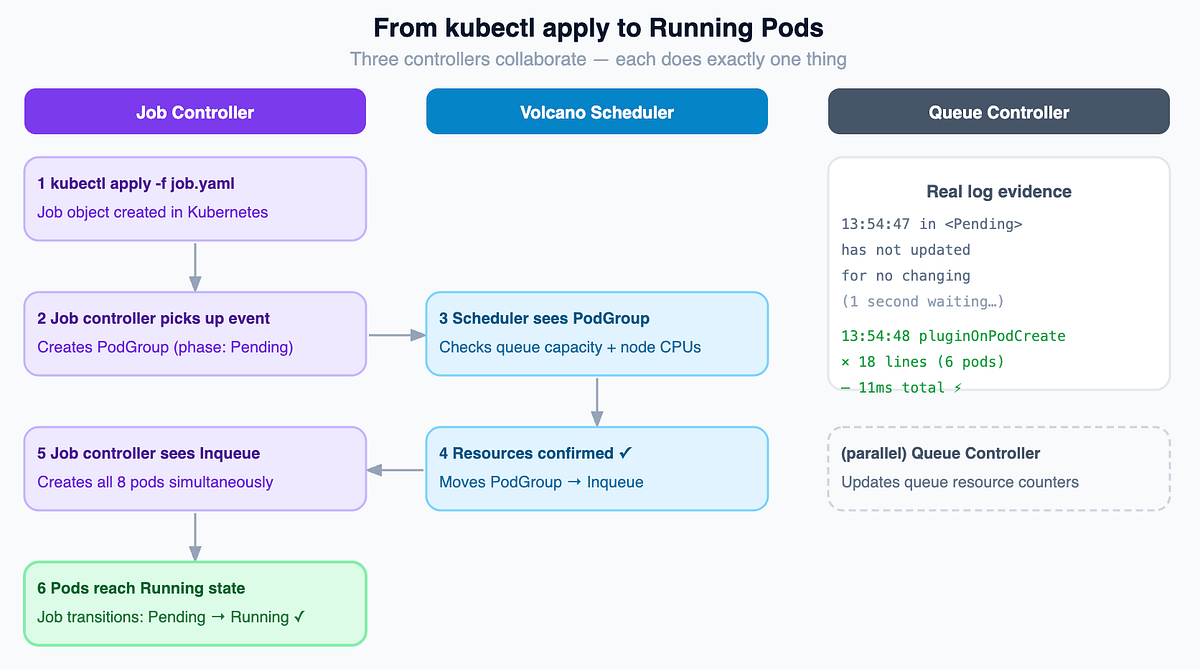
The Queue controller runs in parallel throughout, updating resource counters as the PodGroup moves through phases. The PodGroup controller plays no role here because the Job controller created the PodGroup directly in step 2.
Design Trade-offs
Pros of the controller design
- Event-driven with no polling. Thousands of jobs running and the controller manager stays at flat CPU usage.
- State machine isolation means abortingState.go cannot break runningState.go. Adding a new job phase means adding one file and one case in the routing function. Nothing else changes.
- PodGroup as a decoupling layer means the scheduler reads PodGroups, not Jobs. Any workload gets Volcano’s scheduling algorithms without Volcano-specific code in the workload framework.
Cons of the controller design
- Informer cache lag: controllers operate on a cached view of the cluster. Stale reads are possible during high-churn scenarios when many jobs start or stop at the same time.
- State machine complexity: 11 possible job phases, each with its own response to every event type, creates a large decision space that is hard to debug when a job gets stuck mid-transition.
- Operational overhead: three new resource types to define alerting, monitoring, and access control for.
Asides: The claim “no controller polls the API server” is true for steady-state operations. On startup, informers do an initial LIST call — which is effectively a large poll — before switching to a Watch stream. In large clusters with thousands of resources, controller restarts can cause momentary API server load spikes during this initial LIST. Plan your controller restart strategy accordingly in production.
Where to Go Next
- Scheduler layer: How the Volcano scheduler runs PodGroups through a plugin pipeline covering gang scheduling, fair sharing, bin packing, and network topology awareness. Start at pkg/scheduler/.
- Webhooks: How Volcano validates and mutates Job specs before the controllers ever see them. Start at pkg/webhooks/.
- First contribution: Start at pkg/controllers/job/state/. Each state file is under 70 lines. It is the clearest and most self-contained part of the codebase and the best entry point for a first contribution.
- Full codebase: https://github.com/volcano-sh/volcano